

Shopify PayPal Guest Checkout for PH Stores
You've enabled PayPal in Shopify, added a card to the cart, and expected the buyer to pay in a few taps. Instead, the checkout asks for a PayPal login, the total changes from PHP to another currency, or the guest card option disappears completely on mobile. For a Philippine store, that small gap between “PayPal is connected” and “a first-time buyer can pay easily” can decide whether the order is completed.
Shopify PayPal guest checkout works best as part of a wider payment strategy. It can give cardholders a way to pay without creating a PayPal account, but it doesn't automatically solve local wallet preferences, currency confusion, redirects, shipping concerns, or trust issues. The practical task is to make the guest card path clear while keeping faster local payment options visible.
Table of Contents
- Understanding the Philippine Checkout Landscape
- Configuring Your PayPal Account for Guest Payments
- Optimizing the Buyer Flow and Currency Display
- Evaluating Guest Checkout Against Local Wallets
- Troubleshooting Common Guest Checkout Failures
- Building a Complete Payment Strategy for Growth
Understanding the Philippine Checkout Landscape
Philippine shoppers don't approach checkout with one universal payment habit. Some buyers are comfortable entering card details, especially when purchasing from a store they recognise. Others expect the speed and familiarity of a digital wallet or QR-based payment flow. PayPal guest checkout matters because it serves the first group without forcing every cardholder to become a PayPal member.
The local context makes this distinction important. Digital wallets represented 41% of e-commerce transaction value in 2025, while QR Ph merchant acceptance grew 148.7% year on year in 2024, according to independent Philippines payment coverage. A card-only checkout can therefore feel incomplete to a buyer who normally confirms purchases through a wallet. A PayPal card path can still remove a barrier for customers who have a debit or credit card but don't use the wallet options your store already offers.
Where PayPal guest checkout fits
Think of PayPal guest checkout as a card acceptance route, not as your entire payment solution. It can be particularly useful for:
- First-time buyers: A shopper can enter card details without registering for a PayPal account.
- Gift purchases: Buyers may want to complete an order quickly without creating another account for a one-off purchase.
- International customers: Overseas buyers may already recognise PayPal, even if local buyers prefer a Philippine wallet.
- Trust-sensitive products: A recognised payment brand can provide reassurance when the customer is buying a fragrance they've never smelled in person.
For a fragrance store, payment convenience works alongside product reassurance. Buyers often want to confirm authenticity, scent comparisons, delivery coverage, and return information before they commit. Useful supporting content, such as this guide to buying authentic perfume online in the Philippines, should answer those questions before the shopper reaches payment.
Practical rule: Use PayPal guest checkout to capture card buyers, but don't make a card-based PayPal flow the only obvious route for Philippine customers.
The right test isn't “Can PayPal process this order?” It's “Can a first-time buyer understand the payment choice, keep the expected PHP total in view, and finish without an unnecessary account or redirect?” That standard should guide every setting that follows.
Configuring Your PayPal Account for Guest Payments
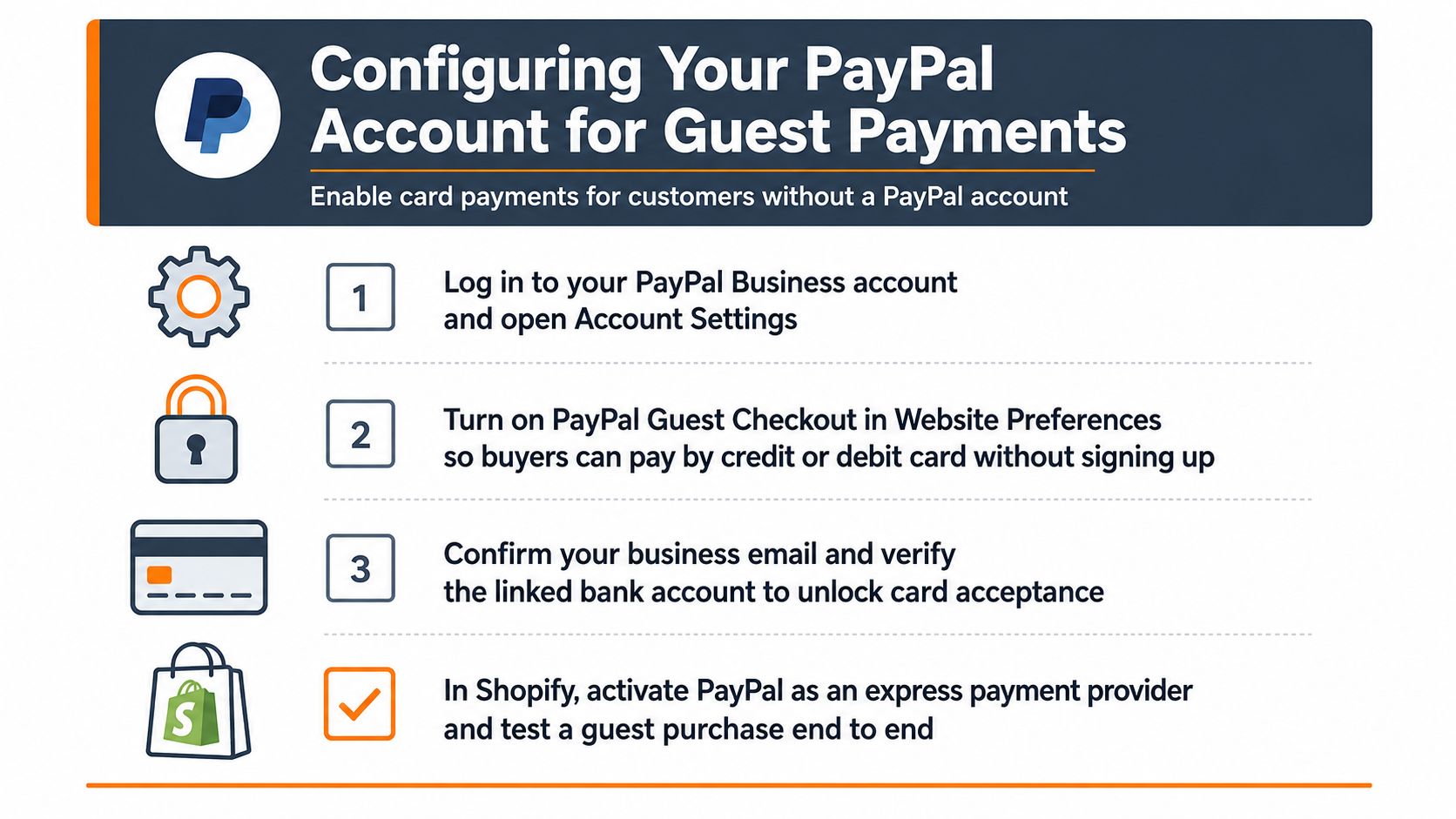
A PayPal connection in Shopify isn't enough by itself. The account and checkout preferences must allow a customer without a PayPal login to use a credit or debit card. PayPal's Philippines checkout documentation describes guest checkout as a way for buyers to pay by card without a PayPal account.
Start with a PayPal Business account rather than treating a personal account as a merchant configuration. Then check the account's website and payment preferences before testing Shopify. PayPal's dashboard labels can change, so look for the guest checkout or account-optional setting under the website payment preferences area.
Enable the account-level option
Use this sequence as a working checklist:
- Open the PayPal Business account settings. Sign in to the merchant dashboard and open Account Settings or the equivalent website payment preferences menu.
- Turn on guest checkout or account-optional payments. The relevant preference should allow a customer to pay by credit or debit card without signing up for PayPal. If the setting is disabled, Shopify may send the buyer directly towards a PayPal login.
- Complete merchant verification. Confirm the business email and finish the available bank or identity verification steps. An incomplete merchant profile can create payment restrictions that look like a Shopify problem.
- Connect PayPal inside Shopify. In Shopify admin, open Settings, then Payments, select PayPal, and connect the Business account using the available authorisation flow. If Shopify presents an express or alternative payment provider choice, activate the PayPal option that supports the checkout flow you intend to test.
Don't assume the visible PayPal button proves that guest payments work. A logged-in PayPal account can take you through a successful wallet payment while hiding the experience your new customer will see.
Test the path as a stranger
Before announcing the option, open the storefront in an incognito window. Add a product, proceed to checkout, select PayPal, and look for a clearly visible card route or guest option. Use a test order process that won't create an accidental live charge, or place a low-risk live test and refund it according to your store procedure.
Check the full journey on both mobile and desktop. Confirm that the order appears in Shopify, that the payment status is clear in PayPal, and that the buyer receives the expected confirmation. Your customer-facing frequently asked questions should also match the payment options and account requirements shown at checkout.
The configuration is complete only when a buyer without a PayPal account can reach the card form, see the total, submit payment, and receive a normal order confirmation.
For a visual walkthrough of the account and Shopify connection, use the following video after reviewing the settings above.
Optimizing the Buyer Flow and Currency Display
A working guest option can still underperform if the storefront hides it behind a wallet login or presents it as an afterthought. The buyer should understand the available routes immediately: PayPal for customers who want it, guest card payment for customers without an account, and any local wallet or bank method that suits your Philippine audience.
Shopify's checkout guidance highlights the effect of payment-method ordering and wording. It recommends making labels such as “Guest Checkout,” “Checkout as Guest,” or “Continue as Guest” prominent buttons rather than subtle text links. That wording matters because a buyer may interpret a small link as secondary, unavailable, or suspicious.
Check the flow from cart to confirmation
Walk through the experience in the same order as a customer:
- Product page: Show the price in PHP and make shipping expectations easy to find before the buyer commits.
- Cart: Display the item total, available delivery information, and any free-shipping threshold without forcing the customer to discover it late.
- Payment selection: Keep PayPal and the guest card route distinct. Don't make the buyer guess whether selecting PayPal will require an account.
- PayPal screen: Confirm that the displayed total remains understandable and that the return path to Shopify is obvious.
- Confirmation page: Check that the order number, payment status, delivery information, and customer support route are consistent.
PHP display deserves special attention for a Philippine store. A buyer who sees one amount on the product page and a different currency during payment may hesitate, even when the converted value is technically correct. Keep PHP visible throughout the storefront and make any PayPal conversion or international processing behaviour clear in your payment information.
Reduce mobile uncertainty
Redirect-heavy flows create more opportunities for a customer to close the browser, lose connection, or wonder whether payment succeeded. Keep the number of transitions low, avoid unnecessary account prompts, and test the back button. A buyer who returns to Shopify after PayPal should not face a blank cart, a duplicate payment warning, or an unexplained error.
Put the guest card choice where shoppers can see it without excessive scrolling. If an accelerated checkout button dominates the screen, check that it doesn't push the standard payment route below the fold. The goal isn't to hide fast wallets. It's to give each customer a clear next step.
Evaluating Guest Checkout Against Local Wallets
PayPal guest checkout solves one specific problem, card payment without a PayPal account. It doesn't automatically match the speed or familiarity of a local wallet. Treating it as a universal replacement can create a poor payment mix, particularly for mobile-first Philippine shoppers.
The Bangko Sentral ng Pilipinas payment measurement report records that digital payments reached 57.4% of total monthly retail payment volume in 2024 and 59.0% of payment value. The corresponding figures were 52.8% of volume in 2023 and 42.1% in 2022. That trend supports a broader operational conclusion: digital payment behaviour is becoming normal, but normal doesn't mean every shopper wants the same provider.
Match the method to the buyer
| Payment Method | Best Use Case | Primary Friction Point |
|---|---|---|
| PayPal guest checkout | Cardholders without a PayPal account, plus buyers who already trust PayPal | Redirects, account prompts, or currency uncertainty can interrupt the flow |
| Native local wallets | Philippine shoppers who prefer a familiar mobile payment experience | Availability depends on the gateway, Shopify plan, and merchant onboarding |
| Standard card form | Buyers who want direct card entry and don't want a wallet | Manual typing creates more work, especially on mobile |
| Bank transfer | Higher-value orders or customers who prefer direct account payment | Confirmation and fulfilment may require manual checking |
| PayPal wallet payment | Existing PayPal users who want stored details and account protection | It doesn't serve buyers who want a card-only guest route unless that route is enabled |
The strongest setup usually presents PayPal guest checkout as the card fallback or card alternative, while local wallets remain visible for domestic shoppers. For an international buyer, PayPal may be the most recognisable option. For a Philippine buyer who expects a wallet, it may be slower than the payment method already on their phone.
Decide with checkout evidence
Review your Shopify payment reports and customer support messages together. If customers ask whether they can use a card without PayPal, the guest route deserves stronger placement. If they ask for a familiar local wallet, adding or improving a local gateway may address a larger obstacle.
Don't judge a method only by whether transactions succeed. Compare where shoppers stop, which payment buttons they select, and whether support requests mention login, conversion, or failed redirects. A payment option that technically works but consistently confuses buyers is still a conversion problem.
Troubleshooting Common Guest Checkout Failures
When guest checkout disappears, merchants often change several settings at once. That makes the fault harder to isolate. Use one clean test session, record the exact screen where the flow changes, and then adjust one variable before testing again.
Industry payment guidance cites 70.19% average cart abandonment, and the same checkout friction reference notes that long or complicated checkout experiences can contribute to abandonment. The figure isn't a diagnosis for your store, but it shows why a missing guest route deserves investigation rather than a casual assumption that shoppers just changed their minds.
Start with a controlled test
Open the store in a private browser window with no saved PayPal session. Test on a mobile connection as well as Wi-Fi, and use a buyer email that isn't already linked to a PayPal account. Record the device, browser, currency, cart contents, and exact error message.
Then work through these likely causes:
- Account settings force a login: Return to PayPal's merchant preferences and confirm guest or account-optional checkout is enabled. A saved merchant session can mask the issue, so retest while signed out.
- Accelerated buttons bypass the intended route: Temporarily review Shop Pay or other express buttons on the product and cart pages. They should offer speed without making the card route difficult to find.
- Currency settings conflict: Check Shopify Markets, store currency, product pricing, and PayPal currency handling. A mismatch can cause a decline, a warning, or an unexpected conversion screen.
- Redirects break the session: Test whether the buyer returns to the correct Shopify checkout after PayPal authorisation. A blank cart or repeated payment prompt suggests a handoff problem rather than a card problem.
- Risk controls reject a valid transaction: PayPal can review guest card transactions differently from account-based payments. Check the transaction details and merchant notifications before weakening fraud controls. A single decline shouldn't justify removing protections from every order.
Confirm trust after the fix
Place a small controlled order or use the approved test process, then verify the Shopify order record, PayPal transaction status, stock adjustment, confirmation email, and refund workflow. Keep a record of the successful browser and device combinations so future staff can reproduce the test.
For a store where buyers need additional reassurance before paying, a transparent proof of transactions page can support the broader trust experience. It won't repair a technical decline, but it can reduce uncertainty before the customer reaches payment.
Building a Complete Payment Strategy for Growth
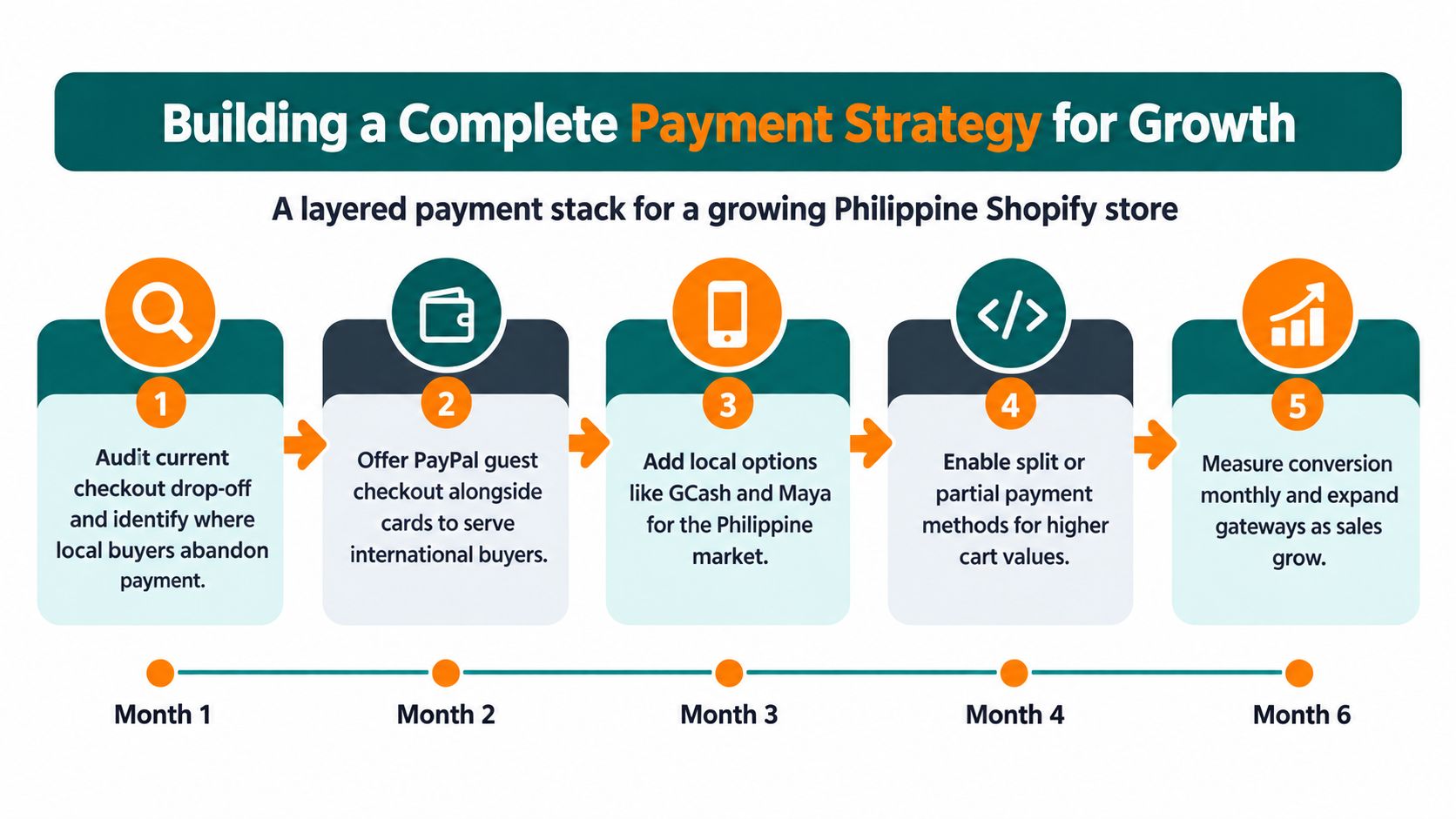
PayPal guest checkout is useful, but one gateway can't cover every Philippine buyer. A growing Shopify store needs a layered payment stack that gives card users a clear route, wallet users a familiar route, and higher-value buyers a practical alternative when a single online authorisation fails.
Start with evidence rather than assumptions. Review checkout drop-off, payment selections, failed transactions, support tickets, and completed orders by device. Then make one payment change at a time and watch whether the affected step improves without creating a new problem elsewhere.
Build the stack in layers
- Audit the current path. Identify whether shoppers leave before payment, at the PayPal handoff, on the card form, or after a currency change.
- Keep PayPal guest checkout available. Use it for customers who want card payment without a PayPal account, including buyers outside the Philippines.
- Add local wallet choices. Offer familiar options such as GCash or Maya when your Shopify plan and payment provider support them. Label each method clearly instead of grouping everything under a vague “online payment” heading.
- Provide a controlled fallback. Bank transfer or another manually verified method can help with larger orders, but publish the confirmation and fulfilment process so customers know what happens next.
- Measure continuously. Review the payment funnel regularly, test the live experience after provider updates, and remove methods that confuse buyers or create repeated operational work.
Don't add every available gateway at once. Too many buttons can make the checkout feel uncertain, while too few options exclude valuable customer groups. Prioritise the methods your actual buyers request and use, then keep the PHP total, delivery terms, and support route consistent across every path.
Dubai Fragrance Shop PH offers authentic Middle Eastern fragrances from brands including Lattafa, Afnan, Armaf, Rasasi, Arabiyat, Rayhaan, and French Avenue, with nationwide Philippine fulfilment and PHP pricing. Visit Dubai Fragrance Shop PH to browse the range and choose a checkout option that suits your payment preference.